
WLS Mobile App Scheduled to Change
iPhone & iPad users:
there’s a new app to download.
Android users:
you just need a quick update.
iPhone & iPad Users:
1) Download the new app called Solus Library App from the App Store.
2) Open it, type WLSMobile (one word) in the Library Code box, and tap Continue.
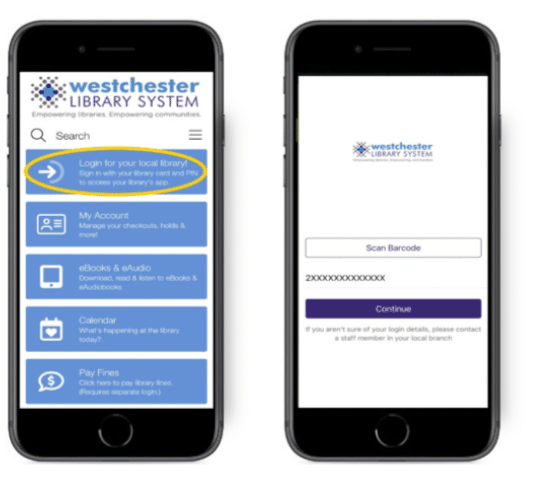
3) When the app loads, you’ll see the Westchester Library System Homepage. Tap on the “Login for your local library!” Button to access your library.
4) Scan the barcode on your physical library card, or type in your library card number and tap on the Continue button.
5) Enter your PIN and then tap on the Login button.
6) You’ll be taken to your library’s app.
Android users:
Auto-updates are expected soon on the Google Play Store. At that time, the app will install automatically. If it does not, open the Play Store, search “WLS Mobile,” and tap Update. Then log in with your library card number and PIN.
Google Play Store for Android

Solus Library on App Store for Apple

FAQS
What carries over?
Your library card number, linked accounts, holds, and checkouts will carry over automatically. You can make new lists in the app, but pre-existing lists & history won’t carry over. Don’t worry! They’re still in the catalog! You can view and edit those anytime by logging in to your library catalog in your phone’s web browser at opac.westchesterlibraries.org.
Why the change?
We know the app hasn’t always worked the way it should, so we’re moving to a new, more reliable version. Many of you have been logged out unexpectedly, had the app freeze or crash, or seen it stop updating. We heard you, and we’ve partnered with our vendor, Solus, on a new platform that should work much more smoothly.
Why is it different for iPhone and iPad?
On Android, the new version comes as an update to the app patrons already have.
On Apple devices, we’re still working to publish our own app in the App Store.
Rather than ask you to wait with an app that isn’t working well, we’re inviting iPhone and iPad users to use the Solus app in the meantime. You will have the same library access as Android users.
Do I need to use the app?
If you would rather not use an app at all, you can still do everything in the online catalog through your phone’s browser: access your library card and manage preferences, place and manage holds, and view and edit lists and reading history at opac.westchesterlibraries.org.
